How to Upload Videos on Clipster: Complete Guide to Earn More from Every View.
October 21, 2026
If you have ever posted a video on TikTok, Instagram Reels or YouTube Shorts and wondered why you do not receive direct payment for those views you are not alone. Many short‑form creators spend hours editing clips then wait for creator funds or brand deals that can take weeks to agree on.
That is where Clipster comes in.
Clipster is a platform that lets creators, video editors and clippers earn money from short‑form content by linking them straight to active brand campaigns. Of waiting for sponsorship emails you simply find content edit short clips post them to your social accounts and submit the video link in Clipster to earn money from verified views.
However if you do not know how to use Clipster or if you submit videos incorrectly you risk having your submissions rejected or missing out on earnings.
In this guide we will walk you through everything you need to know about setting up your account finding the right campaigns uploading your videos correctly on Clipster and earning more.
What is Clipster and How Does It Work?
Clipster acts as a bridge between brands, app developers or streamers and short‑form content creators. Brands allocate a marketing budget for campaigns and set a pay‑per‑view rate (CPM) or a flat payout tier.
As a creator on Clipster:
- You browse campaigns inside the app.
- You. Edit short clips according to the campaigns specific rules.
- You post the content on your social media accounts (TikTok, Instagram Reels or YouTube Shorts).
- You copy the video URL and upload/submit it to Clipster.
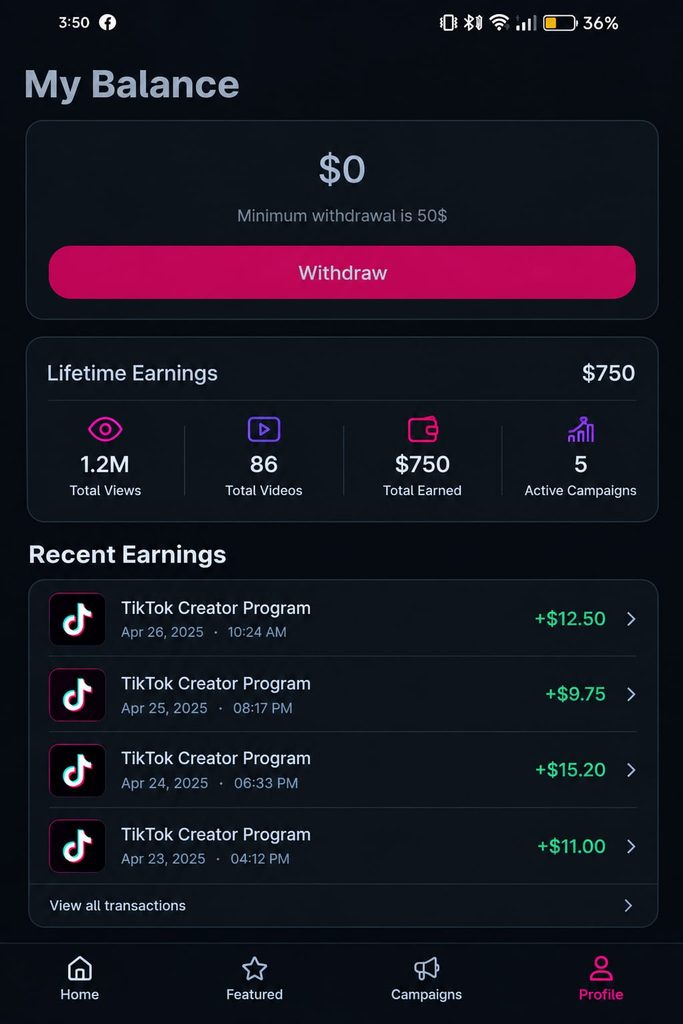
- Clipster tracks your views automatically. Credits your balance.
Because earnings are tied directly to how many people watch better edits bring payouts.
Key Requirements Before You Upload Your First Video
Before you jump into submitting content make sure you have the following prerequisites to avoid system errors or campaign disqualification:
- An Active Social Media Account: You need a profile on TikTok, Instagram or YouTube. Make sure your profile is set to Public so Clipster’s verification bots can fetch your post data.
- Video Editing Software: Popular user-friendly choices include CapCut, Premiere Pro or DaVinci Resolve.
- The Official Clipster App: Installed on your iOS or Android mobile device.
- Original or Correctly Clipped Content: Your video must strictly follow the target campaigns brief.
Step-by-Step Guide: How to Upload Videos on Clipster
Submitting a video on Clipster is a simple two‑step process: first publish the clip on your social media then submit the video link directly to the relevant Clipster campaign. Follow these steps:
Step 1: Log In and Find an Active Campaign
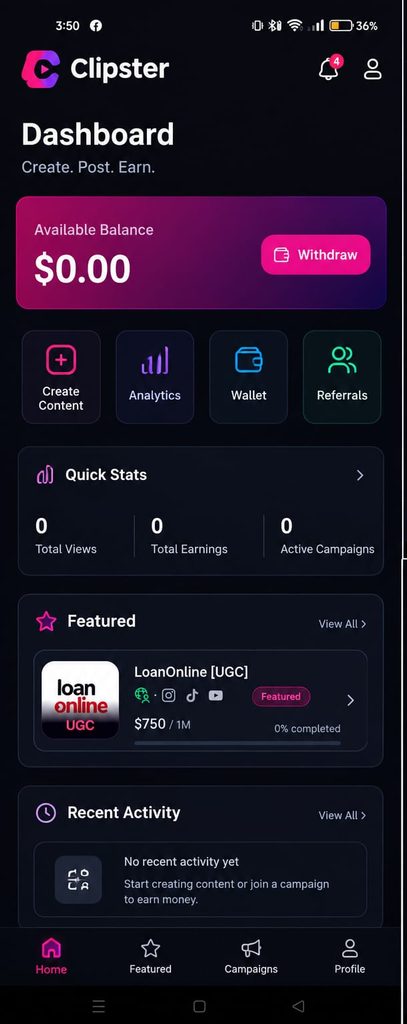
Open the Clipster app and go to the dashboard. Here you will see a list of campaigns sorted by niche, payout rates and rules. Pick a campaign that fits your channel’s content style.
Pro Tip: Read the campaign brief carefully before you create your video. Pay attention to required sound clips, mandatory hashtags, tagged accounts or specific referral links that must appear in your caption.
Step 2:. Edit Your Short-Form Video
Using your favorite editor (for example CapCut) create a 9:16 vertical video that works well for fast scrolling.
- Keep the 3 seconds extremely engaging to hook your viewers.
- Add readable auto‑captions and visual overlays.
- Ensure the video quality is at 1080p, for crisp playback.
Step 3: Publish the Video on Your Social Media
Upload your clip to TikTok, Instagram Reels or YouTube Shorts. While uploading:
- Add every hashtag that the Clipster campaign brief lists.
- Include the required background audio or tag the target brand as directed.
- Make sure the post visibility is set to Public.
Step 4: Copy the Video Link
Once the post goes live on media:
- Tap the Share button on the published post.
- Choose Copy Link.
- Check that the link takes you to the video when you paste it into a browser tab.
Step 5: Submit the Video URL Inside Clipster
Return to the Clipster app to attach your submission:
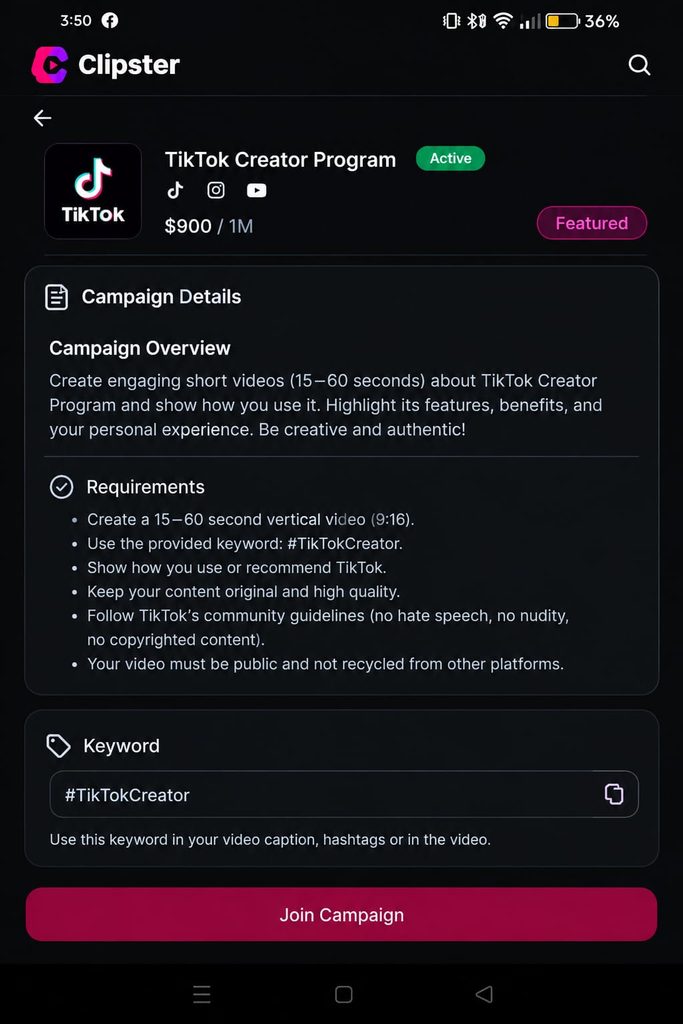
- Reopen the campaign page you chose in Step 1.
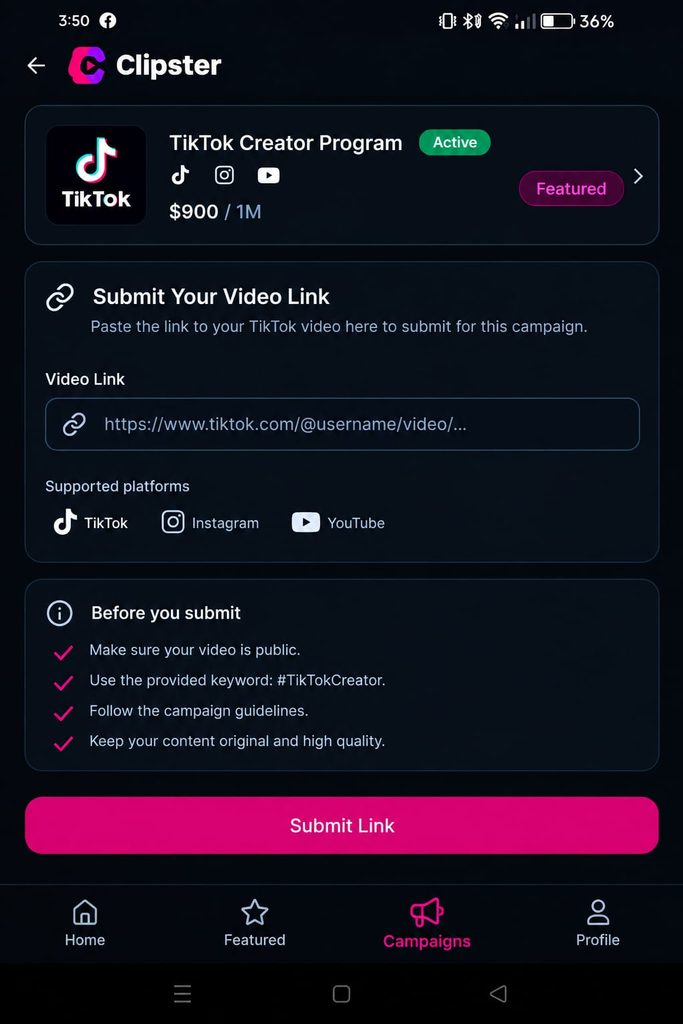
- Tap the Submit Post. Upload Clip* button at the bottom of the screen.
- Paste the copied media URL into the field provided.
- Double‑check that the correct platform is selected whether TikTok, Instagram or YouTube Shorts.
- Press Submit.
After you submit Clipster will review the link to make sure it meets the campaign requirements. Once approved Clipster’s tracking engine will keep an eye on view counts. Refresh your dashboard balance.
Why Was My Clipster Video Submission Rejected?
If the video submission status says “Rejected” or fails to process one of the problems listed below is likely the reason:
- Private. Video: If the TikTok or Instagram account is private Clipster cannot count views. Switch the account or video to Public.
- Missing Hashtags or Sounds: The campaign system looks for the tags and audio. Omitting them will cause rejection.
- Incorrect Link Format: Copy the URL for the post itself not the profile page URL.
- Duplicate Submissions: Posting the link to several campaigns or twice for the same campaign will flag the system.
- Deleting the Video Early: Do not delete or archive a video while the campaign runs. If the system cannot locate the video during checks earned views may be lost.
Best Practices to Increase Views and Earn More on Clipster
Just uploading a video is not enough if you want to earn a solid income on Clipster. Because the payout depends on performance keeping viewers engaged is essential.
1. Master the Visual Hook
The 3 seconds decide if a viewer scrolls past or keeps watching. Begin with a line, visual action or an interesting question.
2. Use Dynamic Captions
than 70% of people watch vertical videos with the sound muted. Adding animated colorful text overlays keeps the audience engaged when the sound is off.
3. Maintain High Editing Pacing
Remove air, long pauses and slow transitions. Keep the clip moving quickly with cuts, sound effects and smooth zooms.
4. Post at Peak Engagement Hours
Look at the analytics to find when the target audience is most active. Posting just before those peak times gives the video a boost and helps the algorithm show it to more people.
Frequently Asked Questions (FAQs)
How long does Clipster take to verify submitted videos?
Link verification usually takes a minutes to 24 hours depending on system load and the specific campaign. Once verified view tracking starts away.
Can I submit the clip to TikTok and YouTube Shorts?
Yes if the campaign brief allows posting on platforms and you submit the unique URL, for each platform.
How do I withdraw my earnings from Clipster?
Once you reach the payout threshold you can request a cash-out directly through the payment method you have linked in your Clipster profile settings.
Final Thoughts
Uploading videos, on Clipster is a simple way for short‑form video editors and creators to earn money without having to wait for brand sponsorships. By following the campaign brief making your video hooks strong and pasting your links correctly you can create a regular money stream from your creative work.
Start choosing your campaign today make a viral edit and submit your link so that your views can become real money!